
Its Finally Happened! PowerShell 7 is being bundled into Windows 11 Insider & Server 2028 Preview 🎉
BOO Yeah, this day has finally arrived!
To all that have been on the journey from 2016 when Jeffery, Joey, Steve & the team open sourced PowerShell, to this point today. From me, I wanna say thank you to all those that have been involved along the way one way or another.
Yes this includes all the people that have screamed and shouted about things, including the ‘It’s not on Winget/nuget/Microsoft Update yet’ kinds of shouting.
https://t.co/GlIQ501gPi
— Jason Helmick (@theJasonHelmick) November 17, 2026
Like I mention, just a small bit of my code is now available in future versions of Windows. More to come, in future, all things dependant that is.
For more info please read the following official posts about both PowerShell 7 coming to Windows & the future Deprecation of Windows PowerShell 5.1, which I will go into detail later on in this post.
- https://devblogs.microsoft.com/powershell/powershell-7-coming-to-windows/
- https://support.microsoft.com/en-us/servicing/os/windows/docs/2026/11/kb5137172-windows-powershell-5-1-deprecation
How I kick the tires and test these new installs.
I’ve written before about Lability in this post. It is not the only way that you can build and run local labs, but it is my preferred way, and well I will be releasing a very much updated & expanded variant of it in 2027 (which has been in progress for many months now) also under the MIT license that it is currently released under.
Whilst this requires a little bit of prework, mostly due to the downloads for these builds being behind a manual login page unless you really start messing with UUP dumps this is how today I kick tires with local virtual machines.

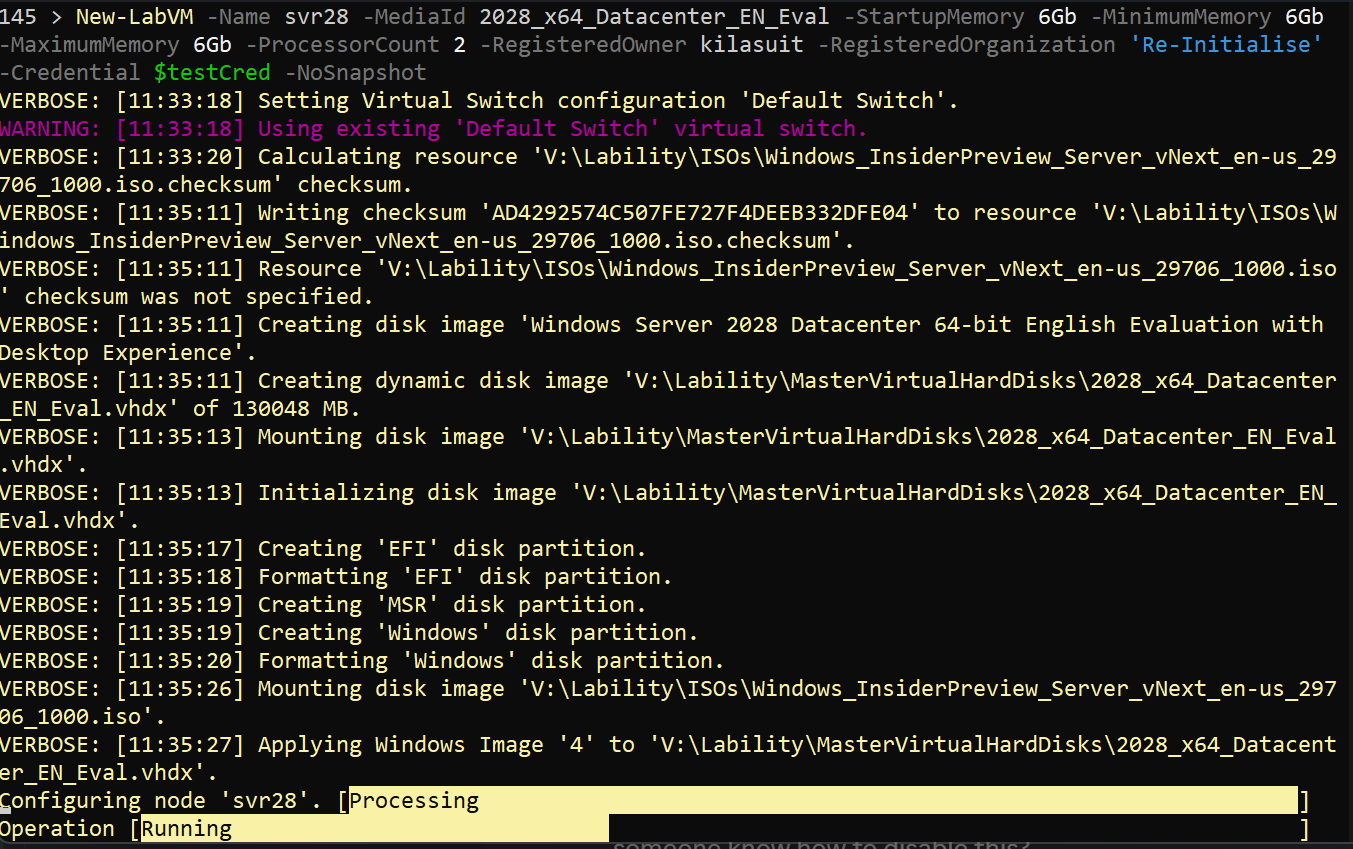
Note I could use AutomatedLab instead, and at some point I may spend time and do some side by side comparisons of these two community offerings.
Confirming How PowerShell is installed.
PowerShell can be installed via a number of different ways.
Going forward, MSI installs are deprecated, with no Installer being provided from 7.7 onwards by the team, and whilst there are community offerings of a repackaged MSI installer, these likely aren’t going to get the same level of support from the team as the offerings that they do provide.
I say this as each additional layer away from source means that you should engage with the repackager of the source for support in the first instance, in case there are some minor differences between their package & the official Microsoft ones. So do bear that in mind. Whilst this can help share the burden of support and maintenance, ultimately if the issue is in PowerShell natively & needs fixed in PowerShell itself, it still requires the team to be able to validate the fixes themselves & importantly sign off on the fixes that they want to take going forward.
This has upset lots of people & rightly so, because well, have you read Who Moved My Cheese?
Now I work out how PowerShell is installed with this code in my PSProfile (this I’m toying with simplifying)
if ((Get-Process -Id $PID).Path -match '\\WindowsApps\\Microsoft') { $ver = $ver + ' MSIX' }
elseif ((Get-Process -Id $PID).Path -match '\\PowerShell\\7') { $ver = $ver + ' MSI' }
elseif ((Get-Process -Id $PID).Path -match 'dotnet') { $ver = $ver + ' dngt' } # Dotnet Global Tool
elseif ((Get-Process -Id $PID).Path -match 'C:\\ps\\') { $ver = $ver + $(get-item (Get-Process -Id $PID).Path).Directory.Name} # Custom Build of PowerShell, so add the directory name, usually a Issue/PR number to the version string so I can see at a glance the context of the build I am running.
elseif ($PSEdition -eq 'Desktop') { $ver = $ver }
else {$ver = $ver + ' ZIP'}
to add to the WindowTitle of the pwsh process (which sadly isn’t passed through properly by Windows Terminal) which has broken one method of process tracking that I’d been using in tasktracker which I need to get back to with new shiney stuff I’ve been working on in the last few months. Luckily this was on path for me anyway that isn’t in PowerShell today.
Also, a total side note, but it’d be awesome for in future in Windows to specify a drive path name that is more like a PSDrive Name and not just A-Z, however that’s a MAJOR redesign to how Windows would need to work, so I doubt that’ll happen anytime soon.
Current Gotcha’s I’ve found.
In testing this and with it being bundled in Windows 11 Insider & Server 2028 Preview I have found these particular issues that weren’t yet tracked in the MSIX tracker issue.
Win11 Insider (29708) & Server 2028 Preview (29706) install 7.6.9 & auto update to 7.7.0
Unless this has been fixed between my first VM deployments and today via some backend setting that we don’t see or can override, both install the 7.6.9 MSIX version & then perform a silent update to 7.7.0 - which given the MSI deprecation notice, this was expected, even if 7.6.10 is available in Microsoft Update Catalog so could be installed, managed and updated via Microsoft Update or whatever process is in use here.
I am not a fan of the size of the msixbundle package that is released with it being 3x the MSI or zip’s.
- Tracked in https://github.com/PowerShell/PowerShell/issues/28453
- This is likely fully intentional, however I would have been generally expecting any update would have stayed within the LTS releases & not jumped between LTS -> STS
- If I find a way that forces this to stay in LTS that issue will get updated with it.
- Some suggest this to be managed by winget pin
winget pin add --id Microsoft.PowerShell --version 7.6.* - I don’t think that to be the case here as winget seems to fail fast with no internet access & MSIX installs can be managed with the AppX cmdlets. Which is I think how PowerShell is actually being installed & managed in these builds. Which would make sense.
- I get this error in Win11 Insider when running winget list on a vm with no Internet Access
Failed when opening source(s); try the 'source reset' command if the problem persists. - I applied the below env var not winget pin & rebooted the VM and gave it a Network Switch that allowed Internet Access. Sadly at 22:24 on 24/11/2026 this still installed 7.7.0 & not 7.6.10.
- I get this error in Win11 Insider when running winget list on a vm with no Internet Access
- I wondered if instead this is still controllable & used behind the scenes via this currently documented Env Var ‘POWERSHELL_UPDATECHECK’ that was in use for the recently ripped out Update Notification Banner to which you can read some background info from me on this in this comment
- Some suggest this to be managed by winget pin
This is confirmed with running the following which will return all events that relate to the deployment of the PowerShell MSIX package/s
Get-WinEvent -ListLog 'Microsoft-Windows-AppXDeployment*' |
    Where-Object RecordCount |
    ForEach-Object {
        $logName = $_.LogName

        Get-WinEvent -LogName $logName -ErrorAction SilentlyContinue |
            Where-Object {
                $_.Message -and $_.Message -match 'PowerShell'
            } |
            Select-Object @{
                    Name = 'LogName'
                    Expression = { $logName }
                },
                TimeCreated,
                Id,
                LevelDisplayName,
                Message
    }
or slightly expanded returning both Installing/Removing properties.
Get-WinEvent -ListLog 'Microsoft-Windows-AppXDeployment*' |
    Where-Object RecordCount |
    ForEach-Object {
        $logName = $_.LogName

        Get-WinEvent -LogName $logName -ErrorAction SilentlyContinue |
            Where-Object {
                $_.Message -and $_.Message -match 'PowerShell'
            } |
            Select-Object @{
                    Name = 'LogName'
                    Expression = { $logName }
                },
                TimeCreated,
                Id,
                LevelDisplayName,
                @{
                    Name = 'Installing'
                    Expression = {
                        if ($_.Message -match '(?ms)Installing:\s*(.+?)(?:\r?\n(?:Removing:|$)|$)') {
                            $matches[1] -split '\s*,\s*|\r?\n' |
                                Where-Object { $_.Trim() } |
                                ForEach-Object Trim
                        }
                    }
                },
                @{
                    Name = 'Removing'
                    Expression = {
                        if ($_.Message -match '(?ms)Removing:\s*(.+?)(?:\r?\n(?:Installing:|$)|$)') {
                            $matches[1] -split '\s*,\s*|\r?\n' |
                                Where-Object { $_.Trim() } |
                                ForEach-Object Trim
                        }
                    }
                },
                Message
    }
which interestingly shows this entry once 7.7.0 has been installed.
LogName          : Microsoft-Windows-AppXDeploymentServer/Operational
TimeCreated      : 11/24/2026 10:10:39 PM
Id               : 854
LevelDisplayName : Information
Installing       :
Removing         :
Message          : Successfully added the following uri(s) to be processed:  x-windowsupdate://4511E41C-CAF7-4B57-810B-
                   7488E77C24E9/A4B64824-B523-4E79-9E4F-83397384832F/f50b3b51a8ffc9321767bfc23c1b6d0eca9df1a8 x-windows
                   update://4511E41C-CAF7-4B57-810B-7488E77C24E9/A4B64824-B523-4E79-9E4F-83397384832F/f50b3b51a8ffc9321
                   767bfc23c1b6d0eca9df1a8\PowerShell-7.7.0-win-x64.msix.
Which is more interesting as there is no 7.7.0-win-x64.msix asset in the releases.
$psr = irm https://api.github.com/repos/powershell/powershell/releases
$76 = $psr | Select name,created_at,tag_name,html_url,assets | where tag_name -Match '7.6' | select -First 1
$77 = $psr | Select name,created_at,tag_name,html_url,assets | where tag_name -Match '7.7' | select -First 1
$77.assets | Select Name,@{N='SizeMB';e={$_.Size/1Mb}} | sort SizeMB -Descending
even more interestingly is this log
LogName          : Microsoft-Windows-AppXDeploymentServer/Operational
TimeCreated      : 11/24/2026 10:11:28 PM
Id               : 617
LevelDisplayName : Verbose
Installing       :
Removing         :
Message          : Successfully updated the status for package Microsoft.PowerShell_7.7.0.0_x64__8wekyb3d8bbwe and
                   user S-1-5-18 (Clear=0x10000C00, Set=0x0).
Because S‑1‑5‑18 is the well‑known Security Identifier (SID) for the Windows Local System account (NT AUTHORITY\SYSTEM), a built‑in account used internally by the operating system with full privileges.
So maybe this means one of the main blockers for MSIX Pwsh has been fixed…?
Server 2028 Preview - Removal of WindowsPowerShell Optional Feature does’t actually work yet (as expected in this early a build)
To clarify, this is just an interesting one from both a security & usability perspectives. I fully expect this will cause headaches due to people expecting the Windows PowerShell 5.1 engine to still be there to fall back on.
This needs modules internally in Windows to be updated for this to be fully capable and if that happens then the PowerShell Implicit Remoting session should be able to be removed for the PowerShell 7.8.x releases, though that’s just speculative at this time.
As of November 24th, the plumbing is there. Just it’s leaky. As can be seen when running dism /Online /Get-Features /Format:Table | findstr /i powershell

The features that matter here are
- MicrosoftWindowsPowerShellRoot
- MicrosoftWindowsPowerShell
though trying to remove them via dism /Online /Disable-Feature /FeatureName:MicrosoftWindowsPowerShell /Remove /NoRestart /LogPath:C:\temp\dism.log /LogLevel:4 doesn’t yet work.
2026-11-22 00:25:21, Info                  DISM   DISM Package Manager: PID=1160 TID=6904 Encountered the option "featurename" with value "MicrosoftWindowsPowerShell" - CPackageManagerCLIHandler::Private_GetPackagesFromCommandLine
2026-11-22 00:25:21, Info                  DISM   DISM Package Manager: PID=1160 TID=6904 Encountered an unknown option "featurename" with value "MicrosoftWindowsPowerShell" - CPackageManagerCLIHandler::Private_GetPackagesFromCommandLine
Also bear in mind that the PowerShell ISE is managed via Capabilities instead of Features
dism /Online /Get-Capabilities | findstr /i powershell

So needs removing via dism /Online /Remove-Capability /CapabilityName:Microsoft.Windows.PowerShell.ISE~~~~0.0.1.0
At least until DISM works in pwsh via the cmdlets which is tracked in
Going forward for me
Who knows what’s gonna happen in the next few weeks and months. Other than colder days for us in the Northern Hemisphere.
All I know is that unless I’m to continue in what to some may seem as a long period of stagnating by being unemployed and on UK benefits & can actually secure paid employment that not only suits me fully, but supports me fully too, has a real trajectory of how my career will change over the following decade, with pay that aligns to actual required expenditure to not only live comfortably but be able to say this weekend I'm ripping out & replacing the kitchen which I will say is quite the challenge, and one I’m more than capable of doing, either alone or with others help, things will likely stay as they are. But who knows eh.
That likely requires some difficult conversations, probably with people that aren’t ready to have them. Some may say that includes me having similar conversations with myself, though all I know is I’ve not stopped having those conversations for well over 2 decades now.
This is the time of year that usually gets me down the most & it’s not to do with the temperature, but more the distance I have between me and my family, whilst (just about) everyone else will be making plans to spend time with theirs.
Not gonna lie but I'm tired
Not gonna lie but I'm kinda bored with life
Not gonna lie but I'm kinda ready to disappear, for a bit, maybe forever.

These are thoughts that I & many others will be having repeatedly on and off in these colder months

As sad as it may seem, and as long as it's just thoughts, and no negative actions occur because of those thoughts

You'll pass us all by and not even realise

Just how dead we may feel behind these weathered eyes.
Anyways that’s enough rambling from me, I’m gonna enjoy a nice cuppa tea & try and decide on what food I’m having for my tea tonight, along with what themes I’m using across vscode for different projects, and importantly plan fixing the things that are broken with the current implementation of this theme in dark mode. All whilst listening to this banger of a mix.
chow4Now